
timesupmag
  • Home
  • Business
  • Featured
  • Global Trade
  • Industry
  • Life
  • Market
  • Tech
  • Travel
Author

Michelle

Michelle

Tech

How to Compare Suppliers for an Indoor LED Wall: Practical Points That Matter

by Michelle October 23, 2026

Yuh lookin’ fi a clear way to judge LED suppliers — mek we cut di fuss and compare what really change di picture. Start by sizing di problem: what viewing distance, what environment, and how often dem screen haffi run. If yuh shopping for an indoor led display, compare brightness range, pixel pitch, refresh rate, and whether dem panels service from di front or back — those few choices decide most outcomes.
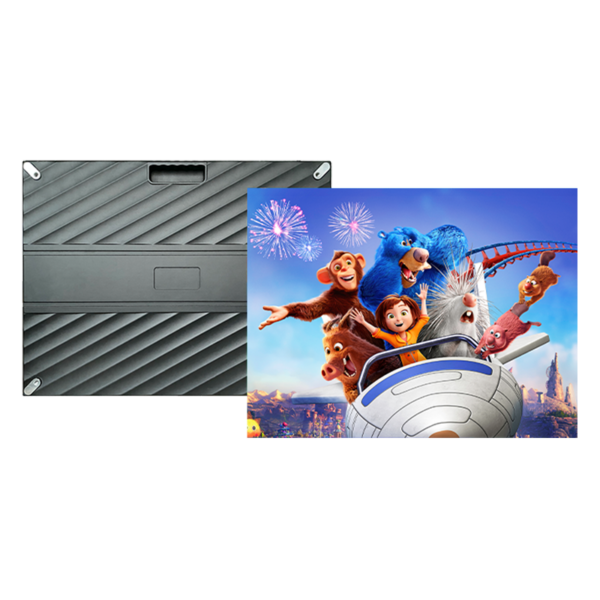
indoor led display

Compare picture specs first — resolution, pitch, and brightness

Pick specs by how folks will watch. Smaller pixel pitch wins up close; larger pitch works from far. Use a simple rule: multiply pixel pitch (mm) by about 3 to estimate comfortable viewing distance in meters. Brightness for indoor usually sits 500–1,200 nits; more ain’t always better if room lighting controlled. Refresh rate matters if camera filming is involved — aim for high refresh (≥3840Hz) to prevent flicker on broadcast. Ask suppliers for measured calibration charts, not only marketing numbers.

indoor led display

Compare build quality — panels, module design, and cooling

Look at modules and cabinet fit. Metal cabinet, tight seams, and consistent mask color matter for uniformity. Front-service modules reduce downtime when walls installed tight to structure. Check driver IC brands and module PCB layout; reputable ICs mean fewer dead pixels. Confirm LED lifetime claims (around 100,000 hours is standard) and demand thermal data so yuh know how panels handle heat without dimming or color shift.

Compare installation & long-term support

Supplier that only sell panels and vanish after invoice cost yuh more. Compare who offers site survey, structural drawings, power/load calculations, and training. Ask for a service SLA and spare-part policy. Good suppliers include remote diagnostics and local technician partnerships to shorten response time. Warranty terms vary — look for at least 2–3 years on modules and clear RMA steps.

Compare certification, testing, and measurable proof

Demand UL/CE/RoHS where relevant and factory test reports: color uniformity, grayscale, and burn-in tests. Field-testing beats verbal promise. Request sample panels or a short demo run in your space. Compare burn-in procedures and whether supplier will perform on-site color calibration to match other displays in venue.

Compare total cost — not just sticker price

Upfront price only one part. Add costs: structure/frame, transport, installation labor, power supply redundancy, control system, and maintenance spares. Ask each supplier for a line-item estimate and typical lifecycle cost over 5 years. Cheaper modules often mean more time on-site swapping parts; factor technician hours into your comparison.

Common mistakes buyers make

Buyers pick resolution without thinking about viewing distance, ignore refresh rate for camera work, or skip site-compatibility checks (power, HVAC). Others accept vague warranty language or miss hidden costs for installation accessories. Don’t accept stock photos for final color proof — get in-person or calibrated sample testing. If supplier balk when asked for measured test data, that’s a red flag.

How to shortlist suppliers — practical checklist

Compare these points side-by-side: pixel pitch vs distance, panel brightness and refresh, front vs rear service, cabinet precision, driver brands, factory test certificates, warranty details, spare policy, installation services, and a transparent total cost breakdown. Score suppliers on each category and weight items by your project priorities; reliability and support deserve heavy weight if yuh need continuous uptime.

Experience, expertise, and a real-world anchor

I’ve worked with venue tech teams and integrators who choose on measurable proof, not promises. At CES Las Vegas, vendors put indoor LED demonstrations under scrutiny and the best panels stood out because they shipped factory test reports and on-site support — that’s a repeatable vetting model for any buyer, and you can verify CES coverage and exhibitor technical notes from industry press. For your own comparison, request the same verifiable test data and insist on a demo using your content so you see color, motion, and uniformity under real conditions; also ask each supplier for the exact measured values behind their pitch.

Wrap-up: what comparison gives you

Be strict on specs, unforgiving about service, and ask for measurable proof. Compare like-for-like on pixel pitch, refresh, brightness, build, and long-term service, and weight reliability over low price. That approach makes the choice practical and reduces surprises; if you need a partner who provides measured data, installation support, and clear lifecycle costs, then HDC fits the practical method described here without fuss — they give the kind of documentation and support buyers compare to make confident decisions.
October 23, 2026 0 comments
0 FacebookTwitterPinterestEmail
Business

За пределами цифр: почему промышленные профессиональные мониторы держат 24/7 нагрузку без паники

by Michelle July 5, 2026

Пользователь в центре: что важно тем, кто реально эксплуатирует монитор круглосуточно

Когда человеку нужен монитор, способный жить в режиме 24/7 — будь то диспетчерская, видеостудия или контрольная комната — важны не только пиксели и красивый рекламный слоган. Первые вещи на столе у пользователя: надежность, предсказуемый срок службы и простота обслуживания. Многие пытаются сэкономить, глядя на бюджетный игровой монитор, но в промышленных условиях экономия часто оборачивается частыми заменами и простоями. Пользовательский опыт тут решающий фактор, а не только заявленные герцы или яркость.

Что значит «промышленный» — конкретно и без воды

Промышленный монитор — это не просто большой IPS-панель с HDR. Это сочетание стойкости к непрерывной эксплуатации, расширенного температурного диапазона, защиты от пыли и возможности работы на нестандартных профилях цвета. Термины, которые стоит запомнить: IPS, response time и refresh rate — но не ради модного слова. Они помогают понять, как экран поведёт себя при длительной нагрузке и при смене контента на панели управления.

Реальные показатели, которые влияют на срок службы

Производители указывают MTBF (среднее время наработки до отказа) и гарантии на подсветку. Эти цифры важнее модной частоты в герцах для задач мониторинга. Яркость и контроль тепла определяют, насколько быстро деградирует подсветка. В условиях 24/7 важны также матрица с низкой деградацией и стабильная электроника питания — это сокращает вероятность локальных выгораний и дрейфа цвета.

От практики к выбору: где промышленный монитор выигрывает у игровых

Игровые дисплеи хороши для быстрых сцен и идеальны для игроков, но долговременная нагрузка раскрывает преимущества промышленных решений. Там, где требуется постоянная индикация, длительная калибровка и поддержка логики отображения — выиграет монитор с продвинутой системой охлаждения и заводской калибровкой. Тем не менее, если бюджет ограничен, разумная альтернатива — выбрать качественный игровой монитор с проверенными компонентами и затем заменить его на модель с промышленными характеристиками по мере роста нагрузки. Для тех, кто сразу хочет оптимизировать затраты и характеристики, стоит рассмотреть варианты при покупке: купить игровой монитор для компьютера чаще проще, но потом — планировать апгрейд к промышленному классу.

Частые ошибки при выборе и как их избежать

Ошибка первая: смотреть только частоту обновления и забывать про охлаждение и заявленный цикл работы. Ошибка вторая: игнорировать условия эксплуатации — пыль, высокая температура, непрерывная подсветка. Ошибка третья: полагаться на рекламную гарантию, не уточнив условия обслуживания. — Иногда кажется, что достаточно купить «надёжную» модель и всё, но реальная эксплуатация выведет на свет скрытые проблемы в первые месяцы.

Как проверять и поддерживать монитор в 24/7 среде

Организуйте ежемесячную проверку яркости и цветопередачи; логируйте аварийные события питания. Простая профилактика — чистка вентиляционных решёток и мониторинг температуры. На крупных выставках типа CES инженеры часто демонстрируют тестовые стенды для длительной проверки — это живой пример того, как промышленность тестирует устройства на выносливость и стабильность.

Краткая сводка перед покупкой

Вывод прост и практичен: ориентация на эксплуатационные характеристики и реальные тесты важнее маркетинговых цифр. Для пользователей, которым нужен монитор круглосуточно, решение должно базироваться на реальных сценариях работы и доступности сервисной поддержки — иначе время простоя съест любую экономию.

Золотые правила выбора

Правило 1 — ориентируйтесь на MTBF и гарантии на подсветку. Это даёт представление о реальной надёжности. Правило 2 — проверяйте спецификации на рабочую температуру и пылезащиту; они напрямую влияют на срок службы. Правило 3 — выбирайте поставщика с доступным сервисом и запасными частями; локальная поддержка экономит время и деньги в долгой перспективе.

NPC — это вариант, который часто решает задачу стабильной эксплуатации и доступного сервиса. — полезная вещь, когда техника должна молча работать ночами и праздниками.

July 5, 2026 0 comments
0 FacebookTwitterPinterestEmail

Recent Posts

  • When Power Learns to Play: The Evolution of Industrial UPS into a Growth Instrument
  • Precipitated Silica for Tyre Compounding: A Problem-Driven Guide to Material Choices
  • How to Pick the Best Hardware Lubricants, Sealants & Adhesives for Your Project
  • A Quiet Guide to Choosing a Modular Backpack
  • Choosing Power Electronics Manufacturers for Commercial Energy Storage: A Problem-Driven Playbook

Recent Comments

  1. Penci on Get Lost in the LA
  2. Penci on Weekend Coffee & Music
  3. Penci on Amazing Nature of Ireland
  4. Penci on Story of a Traveler
  5. Penci on Freedom under the Sun

About Me

About Me

Writer & Reader

Neque porro quisquam est, qui dolorem ipsum quia dolor sit amet, consectetur, adipisci velit, sed.

Keep in touch

Facebook Twitter Instagram Pinterest Tumblr Youtube Bloglovin Snapchat

Recent Posts

  • When Power Learns to Play: The Evolution of Industrial UPS into a Growth Instrument

    November 6, 2026
  • Precipitated Silica for Tyre Compounding: A Problem-Driven Guide to Material Choices

    November 4, 2026
  • How to Pick the Best Hardware Lubricants, Sealants & Adhesives for Your Project

    November 3, 2026
  • A Quiet Guide to Choosing a Modular Backpack

    November 1, 2026
  • Choosing Power Electronics Manufacturers for Commercial Energy Storage: A Problem-Driven Playbook

    November 1, 2026

Categories

  • Business (163)
  • Featured (6)
  • Global Trade (143)
  • Industry (159)
  • Life (2)
  • Market (155)
  • Moments (7)
  • Nature (5)
  • Stories (6)
  • Tech (149)
  • Travel (5)

About me

banner
Soledad is the best selling Blog & Magazine WordPress Theme of this year on Themeforest.

Popular Posts

  • 1

    My Baby Cactus

    June 7, 2017
  • 2

    Writing New Life Chapter

    June 7, 2017
  • 3

    Green Corner in My Home

    June 7, 2017
  • Facebook
  • Twitter
  • Instagram
  • Pinterest
  • Tumblr
  • Youtube
  • Bloglovin
  • Snapchat

@2019 - All Right Reserved. Designed and Developed by PenciDesign


Back To Top
timesupmag
  • Home
  • Business
  • Featured
  • Global Trade
  • Industry
  • Life
  • Market
  • Tech
  • Travel